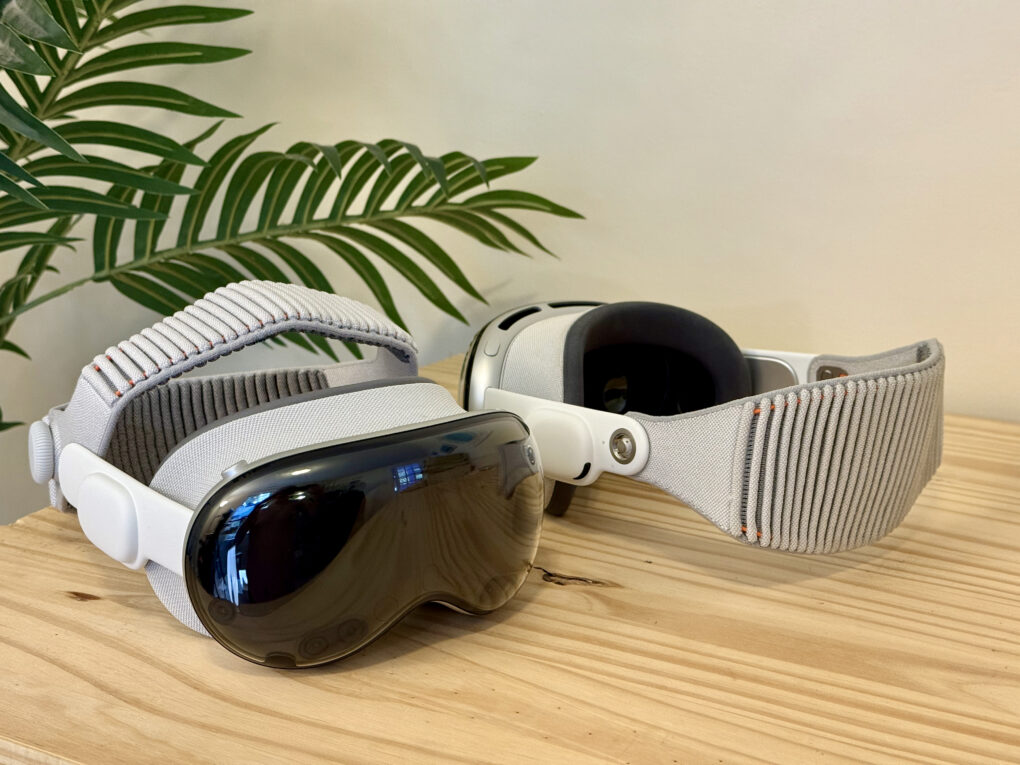
After shelling out well over $3,499 for a Vision Pro, I hope you have some money left over to buy some of the must-have accessories that make Apple’s headset even better.
The experience out of the box is great, but to start, you’ll probably want a case to put your Vision Pro in. If you want to use the headset for browsing the web, messaging, writing or any amount of work, you’ll want a keyboard and trackpad. And for games, you’ll need a controller.
If you don’t have pockets (or the pockets you have prove insufficient), you’ll want a battery holster for walking around. And if you’re walking around, you’ll definitely want a protective cover for that expensive curved piece of glass.
Here are all the accessories I use to make the most of my Vision Pro.
All the accessories you should buy for your Vision Pro
Apple Vision Pro offers a glimpse of spatial computing’s future, but the right accessories make it far more comfortable and practical right now. Whether you’re looking to ease the headset’s weight, extend battery life, or protect your investment on the go, a handful of smart add-ons can upgrade the experience.
These accessories make Vision Pro seem less like an expensive toy — and more like a functional spatial computer.
Table of contents: Best Vision Pro accessories
- AnnaPro A2 head strap
- AnnaPro B1 carrying case
- Keyboard and trackpad
- Protective front cover
- Game controller
- Battery holster
- Display stand
- Polishing cloth
- More on the Vision Pro
AnnaPro A2 head strap
- Super comfortable
- Removes pressure from face
- Use Vision Pro without the Light Seal
- Installation requires unplugging Vision Pro battery

The AnnaPro A2 head strap is a product I recommend for absolutely everyone with a Vision Pro. It’s a solid plastic strap with a variety of different foam pads that sits on your forehead.
The real game changer is that with the AnnaPro A2 head strap, you can use the Vision Pro without a Light Seal. This gives you back your peripheral vision. It’s absolutely essential if you mostly use your Vision Pro in AR or mixed reality mode, as I do. Your Vision Pro has a much wider field of vision for free. Without the Light Seal, the Vision Pro is also far easier to put on and take off. It doesn’t feel like putting on a headset; it’s more like wearing big, weird glasses.
Installation of the AnnaPro A2 head strap is easy. You take off the original strap and disconnect the battery, then slide the arm onto the temples of the Vision Pro. It sits around the headset’s speaker pod, but comes with a cutout so it doesn’t interfere with the sound quality. It works better with the original Solo Knit Band, though you can use it with the Dual Knit Band that comes with the M5 Vision Pro as well.
Buy from: Amazon
Price: $49.99
AnnaPro B1 carrying case for Apple Vision Pro

You’ll need a place to store your Vision Pro when you’re not using it — and something to carry it in for travel. The giant cardboard box it comes in makes for a good temporary solution, but it’s not too practical considering how huge it is.
If you bought the AnnaPro A2 head strap (which you should!), then you should buy the AnnaPro B1 case as well. It has a little extra height to make sure it fits a Vision Pro with the strap attached. It comes with a nice drawstring bag for you to store your cables, power adapter and cleaning cloth; the Vision Pro battery fits in two Velcro straps attached to the lid. An adjustable piece in the middle protects the inside of the headset.
If there’s one downside, the AnnaPro B1 case doesn’t have a lot of extra room for accessories, like a keyboard or controller. So you’ll need to carry those in a separate bag when traveling.
Personally, I keep the case in a living room side table, and always put the Vision Pro in there when I’m not using it.
Buy from: Amazon
Price: $49.99
Keyboard and trackpad accessories for Vision Pro

Photo: D. Griffin Jones/Cult of Mac
If you want to use your Vision Pro as a basic immersive screen for watching TV and screen mirroring, then the eye tracking and voice dictation for input might be good enough. But if you’re doing anything more than the basics, you’ll really want a dedicated keyboard and trackpad for extra precision.
Personally, I use the Mokibo Fusion Keyboard. It’s a laptop-style keyboard with flat keys … that doubles as a trackpad. Yes, the keyboard itself also functions as a trackpad.
In all honesty, it’s not great at either function, but it gets the job done. Plus, it offers pretty good battery life and it’s very small and light.
A larger combo keyboard-and-trackpad I’d recommend is this inexpensive Czur K5S Bluetooth keyboard with touchpad, which comes as one unit.
This tray holds your Apple Magic Keyboard and Apple Magic Trackpad together in one unit.
Ideal for using both on a bed, couch or in your lap. The Apple Magic Keyboard and Trackpad work with Mac, MacBook, iPhone, iPad and Vision Pro.
Keyboard and trackpad not included.

Or, if you already own an Apple Magic Keyboard and Magic Trackpad, you can get a tray that holds both of them together as one unit. That guarantees it comes with Apple-labeled keys for Command and Option, with the best trackpad performance.
Buy from: Amazon
Price: $35.98
Protective front cover accessories for Vision Pro
Protect the expensive curved cover glass on your Vision Pro with this clear cover. It features cutouts for the sensors on the front of the Vision Pro to ensure all the sensors and cameras are unobstructed.

I live in fear of cracking the front glass on my Vision Pro. It’s one of the most vulnerable pieces of the headset’s design, and you’re looking at a hefty $799 bill if it needs replacing. You may be super-careful, but just one instance of walking into a door or leaning down and bumping a table corner could be a very expensive mistake.
Luckily, you can buy a protective cover. Covers that entirely surround the cover glass tend to interfere with the hand tracking. The dbrand cover I use surrounds the Vision Pro in a sort of spiderweb of plastic, with lots of cutouts around all the sensors — it’s not very attractive, but it gets the job done. Unfortunately, it was a limited run, and now it’s sold out.
Instead, I recommend the Rc-Z Screen Protector Case. It also comes with cutouts for the headset’s sensors, but it covers the rest of its body with a much more attractive clear plastic. It protects the Vision Pro while still showing off its gorgeous design.
Buy from: Amazon
Price: $23.99
Game controller
Sony’s PlayStation 5 controller is fully compatible with Apple devices, too. Pair with your iPhone, iPad, Mac, Apple TV or Vision Pro for precision gaming.

Playing games in the Vision Pro is an excellent experience. Unfortunately, the library of full VR games isn’t that big. But even playing 2D games is a real treat. There are plenty of titles on Apple Arcade.
For most games, you’ll want to pair a controller. If you own a modern console, you probably already use a controller that works with it. You can pair a Nintendo Switch, PlayStation or Xbox controller with any Apple device. You can use just about any Bluetooth controller, too.
Personally, the PlayStation controller is my favorite. It’s very comfortable and ergonomic. I like how the D-pad is level with the buttons, as I play a lot of old 2D games where a D-pad is preferred.
For playing VR games, you can try the Sony PlayStation VR 2 controller. This controller was designed specifically for headsets and has full support in visionOS 26. (Although the number of full VR games is not especially high.)
Battery holster accessories for Vision Pro

I find it easy to slip the Vision Pro’s battery pack into my pocket, but you’ll have less luck if you wear loose shorts or sweatpants that could fall down from the weight — not to mention leggings that don’t have pockets.
To make it easy to move around with the Vision Pro, you can buy a belt holster. The battery slides in firmly, and then you can attach it anywhere you want. You can clip it to your waistband, belt, hoodie, the outside of your pocket — whatever’s comfortable.
The dbrand holster I use matches the heinously ugly protective cover, covering the Vision Pro battery pack with a weird black spider web. It’s also, unfortunately, no longer sold.
This product looks just as good — if not better because of its pleasant minimal design. The battery slides in easily and the clip can attach wherever you need it to.
Buy from: Amazon
Price: $19.99
Display stand for Vision Pro
Display your Apple Vision Pro in style. Crafted from high-quality TPU, and aluminum with a silicone grip for exceptional durability. The built-in cable holder keeps your charging cable organized and tangle-free.
Also compatible with Meta Quest, Galaxy XR and other headsets.

If you’d like to show off your investment expensive toy in a place of pride, a Vision Pro stand is a great choice. I really like the Spigen stand, which elevates the Vision Pro at a dramatic angle. You can coil the headset’s power cables behind it, and set it on the base of the stand.
Unfortunately, Spigen’s stand requires the Vision Pro’s Light Seal to be attached to sit properly. As I use the AnnaPro head strap sans-Light Seal, I don’t use the stand very often.
I wish I had a reason to use it more; it’s very nice. The arm consists of sturdy metal and the rest of the stand is made of very nice materials.
Buy from: Amazon
Price: $69.99
Polishing cloth
Made with soft, nonabrasive material. The Polishing Cloth cleans any Apple display, including nano-texture glass, safely and effectively.
Safe for use with all iPhones, iPads, Apple Watch, Macs, Vision Pro and Apple displays with standard and nano-texture glass.

To keep the Vision Pro’s cover glass and eyepieces clean, you’ll need to use the right microfiber cloth. Never rub either of the headset’s sensitive components with a paper towel or shirt — you really don’t want to scratch them. But they do accumulate a lot of dust.
The Vision Pro comes with a special Apple polishing cloth, but you’ll probably want a couple of spares. I keep a few in different spots around the house to make sure I always have one nearby. A quick wipe down is all it needs.
Buy from: Amazon
Price: $19
More on the Vision Pro
After checking out the top Vision Pro accessories, read more about Apple’s spatial computer:
- Read our review of the M5 Vision Pro: “A huge leap in compute power and graphics performance to Apple’s novel mixed-reality platform.”
- How to record spatial video on your iPhone that you can rewatch in your Vision Pro.
- Everything new in visionOS 26: Spatial Widgets and 15 more new features.
- Why Vision Pro is great for writing, and how I use it for work.
- What’s great about movies, shows and games in Vision Pro — how I use it as the ultimate entertainment device.

D. Griffin Jones is a writer, podcaster and video producer for Cult of Mac. Griffin has been a passionate computer enthusiast since 2002, when he got his first PC — but since getting a Mac in 2008, he hasn’t turned back. His skills in graphic and web design, along with video and podcast editing, are self-taught over 20+ years. Griffin has a bachelor’s degree in computer science and has written several (unpublished) apps for Mac and iOS. His collection of old computers is made up of 40+ desktops, laptops, PDAs and devices, dating back to the early ’80s. He brings all of these creative and technical skills, along with a deep knowledge of Apple history, into his work for Cult of Mac.

